The Mac Screen Recorder Built for Designers
Static mockups can’t show how a design feels. Mac Screen Recorder lets designers capture prototype walkthroughs, design critiques, and usability sessions with smooth, elegant mouse motion that conveys real interaction intent — then drop a GIF straight into Figma, Notion, or Slack.
Built for the way designers actually work
Mockups don’t convey motion
A frozen frame can’t show a hover state, a transition, or a micro-interaction. A recording with smooth mouse trails communicates the actual experience you designed.
Async feedback loses nuance
Written comments flatten design intent. Record a short walkthrough explaining your decisions, and stakeholders get the full context — tone, flow, and rationale included.
Usability sessions are messy to document
Capturing a participant’s screen plus their reactions usually means juggling tools. Record screen and webcam together for clean, shareable research clips.
What you can create
Prototype & interaction walkthroughs
Record your Figma prototype or live build with elegant mouse trails that show exactly where attention flows. Auto Zoom highlights the micro-interactions that make your work shine.
Async design critique & feedback
Walk stakeholders through your rationale on your own time. Custom cursors and click highlights keep the focus on the design, not on chasing your pointer around the screen.
Usability testing & handoff
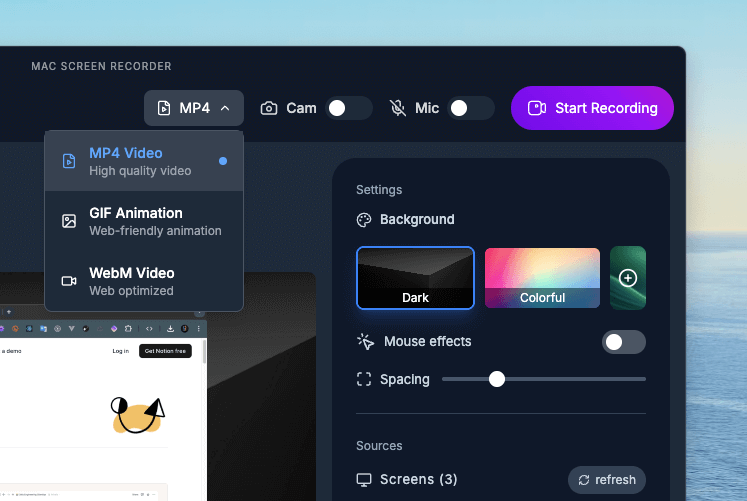
Capture screen and webcam together for think-aloud research sessions, or export a GIF to embed directly in Figma, Notion, or a handoff doc for engineers.
Why designers choose Mac Screen Recorder
Smooth mouse trails
Elegant pointer motion that communicates interaction intent, not just clicks.
Auto Zoom on the details
Draws the eye to micro-interactions and the small touches that matter.
Crisp, high-res capture
Sharp recording that keeps your pixel-perfect work looking pixel-perfect.
GIFs for Figma & Notion
Embed lightweight interaction clips right where your team already works.
Loved by designers

"Helps me showcase interactive designs with zero friction. The clean UI and mouse highlights make feedback sessions so much smoother."
"Makes user testing documentation effortless. Participants stay focused, and I get clean, shareable insights without clutter."
Designers — FAQ
Does it capture high-resolution screens cleanly?
Yes. Mac Screen Recorder captures crisp, high-quality video and can export up to 4K, so detailed UI work and prototypes stay pixel-sharp in the final recording.
Can I embed recordings in Figma or Notion?
Yes. Export a lightweight GIF (or MP4) and embed it directly into Figma, Notion, design docs, or a developer handoff.
Can I record screen and webcam for usability tests?
Yes. Picture-in-picture webcam recording lets you capture a participant’s screen alongside their reactions in a single clip — ideal for think-aloud research.
Can I record just a single window or prototype?
Yes. Smart selection lets you record your full screen or a specific window, so you can capture just your prototype without surrounding clutter.